Structure before screens

Navigation that makes sense.

We organize content, features and navigation around how users understand the product, not around internal teams or technical structure.

ExampleWorkspacePeopleProjectsReportsSettingsDirectoryTeamsRolesProfileBillingSecurityManage seatsInvite people
labels“Manage seats” → “Invite people”, the words people used in tree tests.

The work

The moments we design

The structure that decides whether people find what they came for.

Book a call

The problem

Sounds familiar?

If 2 or more of these ring true, the structure needs work before the screens do.

{{ countLabel }}

{{ ctaText }}Book a call

Selected work

Selected structure work

# Influencer Marketing AI / Product map
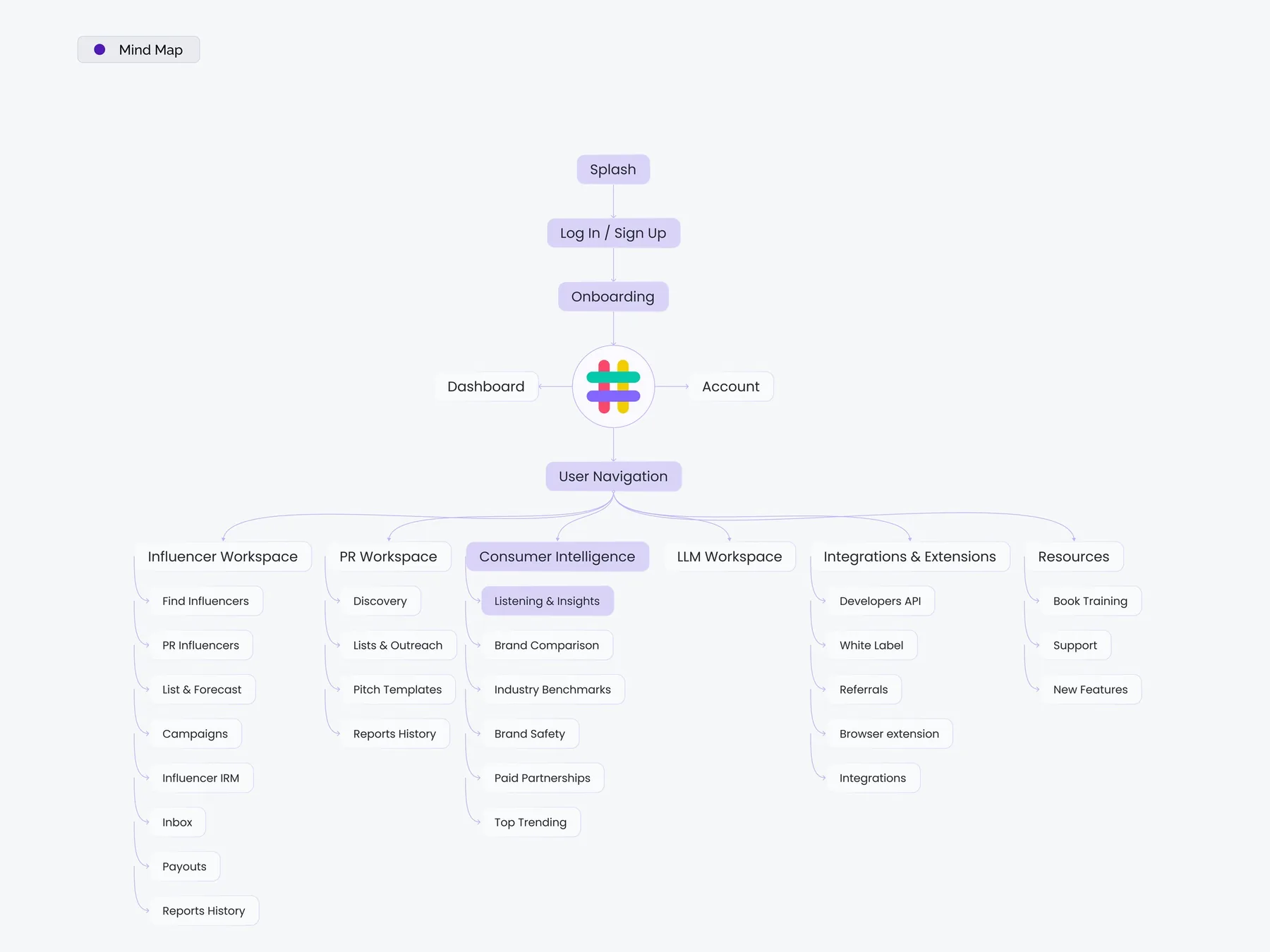
Mind map of the product: splash, sign-up, onboarding, dashboard, account and 6 workspaces with their pages

ScreensInformation architecture

A whole product on one map

A product map for Influencer Marketing AI, from sign-up and onboarding to the dashboard, workspaces, integrations and resources.

  • Sign-up, onboarding, dashboard and account
  • 6 workspaces with their sub-pages
  • Integrations and resources in their own branches
View on Behance

Proof

“Sevgi and her team have been our go-to partner for design and UX. She asks strong questions, communicates fast, works smoothly in Slack and Linear, and delivers high-quality Figma designs that fit our design system.”

Jesper Bergmann · Founder & CEO, Teacherspace
Upwork Job Success
100%
Regular clients
10+
Recognized by
Dribbble Select

Ways to start

2 ways to start

Structure a new product, or untangle the one you have.

  • # New product

    Structure your product

    Navigation, labels and a sitemap, set before the screens are designed.

    • Sitemap and page inventory
    • Navigation and labels
    • Content model
    • Handoff in Figma
  • # Existing product

    Untangle your navigation

    Find where people get lost, then restructure the parts that matter most.

    • Review of the current structure
    • Card sort or tree test
    • New navigation and labels
    • Handoff in Figma

FAQ

Questions founders ask

Book a call

See all questions

01Do you test the structure with users?

Yes, when it helps. Card sorting and tree testing show how people group and find things before any screen is designed.

02How long does a project take?

It depends on the scope. Once we’ve seen the full picture, we’ll share a rough timeline.

03Do we need this before UI design?

For a new or growing product, yes. A clear structure keeps the UI simpler and makes new features easier to place.

04Can you work with our existing product?

Yes. We map what’s there today, find where people get lost and restructure step by step.

05Does this cover our website too?

Yes. We structure product navigation and website pages, so both speak the same language.

Related capabilities

Explore all capabilities

User and screen flows

Every step, decision and failure point, mapped before the screens.

Wireframes

Hierarchy and content worked out before visual polish.

UX and UI design

Content, features and navigation organized around how users think.

Usability testing

Real people, real tasks, and the changes that follow.

Show us the menu nobody understands.

A rough idea is a fine place to start. We’ll get back to you within 24 hours.

Book a call